Features
Use your assistant to record meals, workouts and health details, review your progress and update your plans.
Training
Workouts
Sets, intervals, weights and a history for each exercise.
- Plan warm-ups, exercises and cooldowns with targets, then compare them with your completed workout.
- Combine videos from your preferred creators in one session. Exercise pages include instructions, equipment and demonstrations where available.
Plan 40 minutes of yoga for Thursday: a warm-up, a stronger flow and a wind-down. Use separate videos from my favourite creators.
Movement targets
Weekly targets for distance, sessions or time spent moving.
- Add performance requirements, such as a minimum weight, climbing grade or hangboard setup. Track repetitions, active energy or benchmarks too.
- Use standalone targets or link them to a goal. Add a holiday exception or a dated change; earlier weeks keep their original requirements.
- Movement selects charts from your training, goals and program. Override the selection or order in settings, or through your assistant.
Track three climbing sessions a week. Make it two during my holiday next week, then return to three. Show climbing progress first.
Running
Training volume, pace and progress towards a race.
- Set race distance, date and time targets. Track weekly volume, long runs, easy runs, intervals and tempo sessions.
- Compare planned and recorded distance by week or month. Review recorded time, elevation and training load; choose kilometres or miles.
- Inspect measured splits, pace, best efforts and training zones; missing splits and zone data are not invented. A 10 km total alone cannot establish a 5 km best.
My marathon is on 18 April. Track 30 km a week for now and a separate goal of running 5 km in under 25 minutes. I ran 10 km yesterday in 62 minutes.
Climbing & bouldering
Routes, attempts, sends and benchmarks across sessions.
- Keep a project’s grade, location, link and crux notes alongside its attempts and sends.
- Compare grade distributions and project progress. Board type and angle stay distinct; grades are compared only within supported systems.
- Record hang and rest time, repetitions, load, edge depth and grip. Benchmarks count only attempts with a comparable setup.
Another three attempts on my blue 6b+ project at the gym. Sent it on the third. Add that to the same project and show my progress.
Custom exercises
Add exercises, assisted variations and harder progressions.
- Attach instructions or videos, use the exercise in plans and track each variation separately.
- Choose measurements such as weight, repetitions, hold time and rest time.
Nutrition & health
Nutrition
Ingredients, nutrients and estimates from descriptions, photos or labels.
- Describe substitutions, portions and leftovers. Each meal retains its ingredients and the basis for estimated quantities.
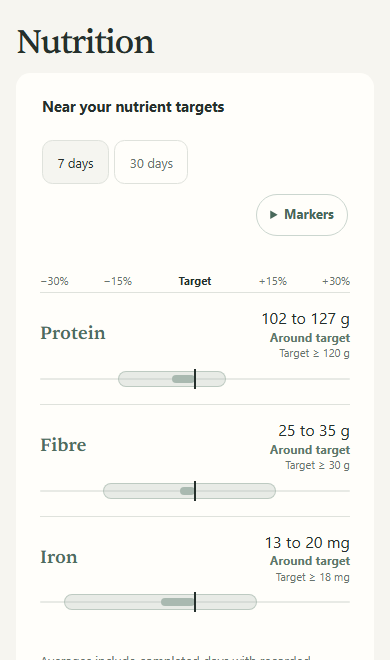
- Track macros, fibre, vitamins and minerals. Label values and estimates remain distinct; unknown nutrients do not count as zero.
- Compare intake with personal targets or reference values, with links to their sources.
Meal planning
Recipes, leftovers and one shopping list across meals.
- Save recipes with ingredients, instructions and preparation time. Plan portions across several days; nutrients adjust to portion size.
- The shopping list combines quantities, groups ingredients by category and separates what you already have. Schedule batch preparation as a separate task.
- Plan around allergies, preferences, cooking time and nutrient targets. Swap meals or portions, then report what you actually ate.
Plan three vegetarian dinners for two. We have chickpeas and rice. Cook enough on Monday for Tuesday, aim for my protein target, and list what we need to buy.
Goals
Weekly habits, milestones and targets for your measurements.
- Set milestones or describe an outcome in your own words. Practice goals can require a duration, such as ten minutes of meditation on four days a week.
- Choose a minimum, maximum, range or exact target. Earlier values retain their dates; personal targets stay separate from general recommendations.
- Review which entries count towards the goal, what remains and where records are missing.
I want two strength sessions each week this month. Use my logged sessions to review progress and help me adjust next week's plan.
Trends & scenarios
Compare weeks of records and chart scenarios with stated assumptions.
- Estimated ranges extend from individual meals to daily totals and averages. They describe plausible values, not guaranteed limits.
- Chat and app use the same calculations. Compare periods alongside the number of days recorded; missing entries do not count as zero.
- Your assistant can model possible outcomes with stated assumptions and uncertainty. Charts separate these predictions from measurements and retain earlier versions.
Health records
Measurements, lab results, symptoms and health routines.
- Save lab values with dates, units, reference ranges and text extracted from reports. Record conditions, appointments, medical events and menstrual periods.
- Track medication and supplement schedules, taken or missed doses, and previous routines. Log stress, energy and symptoms over time.
- Link meditation or breathing plans to weekly goals for days, sessions or minutes. Untimed practice counts towards frequency.
Samsung Health
Import sleep, steps, workouts, weight and body fat on Android.
- Connect through Health Connect for an initial 30 days of history. Sync manually or automatically when Android permits.
- Ask your assistant to add sets, weights or effort to an imported workout. Your changes retain the source link and are protected from later imports.
- Imported workouts include pace, heart rate and swimming details when supplied. Weight and body fat appear under Body & Labs.
- Review sleep stages and overnight heart rate. With enough detailed nights, Membrance adds an experimental score; it is neither Samsung’s score nor clinically validated.
Assistant and app
Preferences
Allergies, food, equipment, schedules and preferred video creators.
- Update preferences without losing earlier values. Follow programs for a defined period, such as pregnancy or race preparation.
- Choose chart order, featured exercises, distance units and climbing grades in the app or through your assistant.
Recording in chat
Record meals and workouts, retrieve history and revise plans.
- Open meal, workout, plan and chart cards inside supported assistants. Available controls depend on the assistant.
- Your assistant can read the values behind charts and retrieve original entries to answer follow-up questions.
History across assistants
Use the same records in new chats or another supported assistant.
- Connect your existing Membrance account to retrieve earlier entries without copying chat history.
- Check source notes, links and reports. Correct entries through your assistant; earlier versions remain available.
Web & Android
Charts, source details, offline plans and reminders.
- Available in English and German, with light and dark themes.
- Downloaded plans work offline on Android. Mark steps done and sync changes when you reconnect.
- Set reminders, quiet hours and lock-screen privacy.
- Review connections and recent assistant activity in Membrance Connect. Disconnect Samsung Health without deleting imported records.
Your assistant saves your health records and plans in Membrance. Explore them in the web or Android app.
Free during beta; assistant subscriptions are separate.